> For the complete documentation index, see [llms.txt](https://docs.asphodel.io/llms.txt). Markdown versions of documentation pages are available by appending `.md` to page URLs; this page is available as [Markdown](https://docs.asphodel.io/kamigotchi/gameplay/editor.md).
# Quick Start
A very quick guide on playing Kamigotchi
## Funding your wallets
Kamigotchi runs on the Yominet blockchain; if your wallet doesn't have Yominet added yet, go to [app.kamigotchi.io](https://app.kamigotchi.io). After connecting your wallet, you'll be prompted to add Yominet as a network.
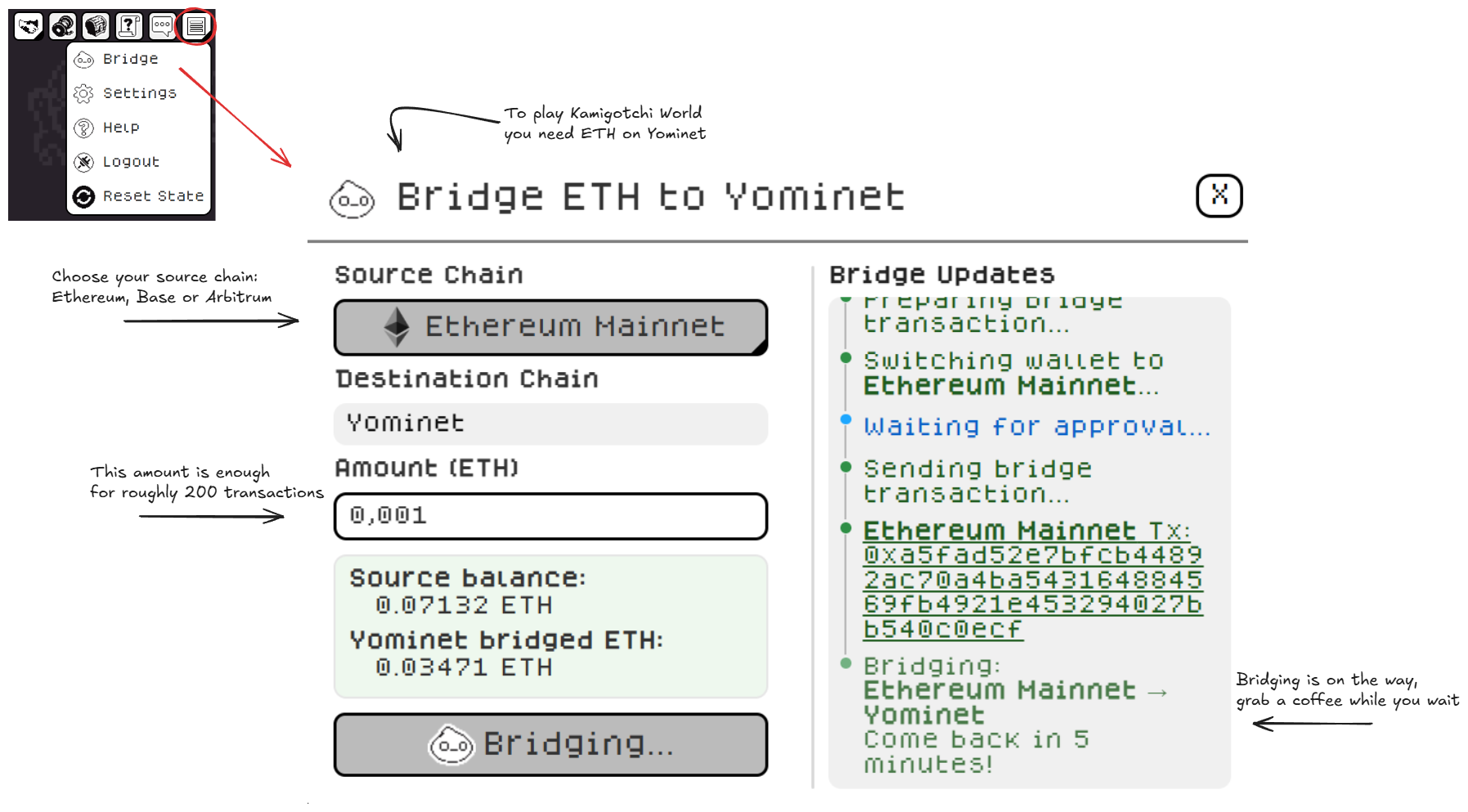
Yominet uses $ETH as gas. You can bridge $ETH to Yominet in a few simple steps. Select your source chain and the amount of ETH to transfer, then press Bridge to Yominet to initiate.
Kamigotchi currently supports Metamask and Rabby for sign-in. These are referred to as the “Owner” wallets in-game.
Once you've bridged $ETH to Yominet, continue creating your account in [Kamigotchi](https://app.kamigotchi.io)!
### Owner wallet? Operator wallet?
After you've succesfully funded your Owner wallet with $ETH and created your Account, you'll be prompted to fund your "Operator" wallet. Many in-game transactions take place using an abstracted Privy wallet rather than your Owner wallet — we call this the “Operator” wallet. You fully own and control the Operator wallet at all times.
You're able to fund and withdraw $ETH from the Operator wallet at all times, and nobody else can control your Operator wallet. You can withdraw $ETH by clicking the "More" ( ) button on the top right and clicking the "Fund" button.
## Acquiring a Kamigotchi
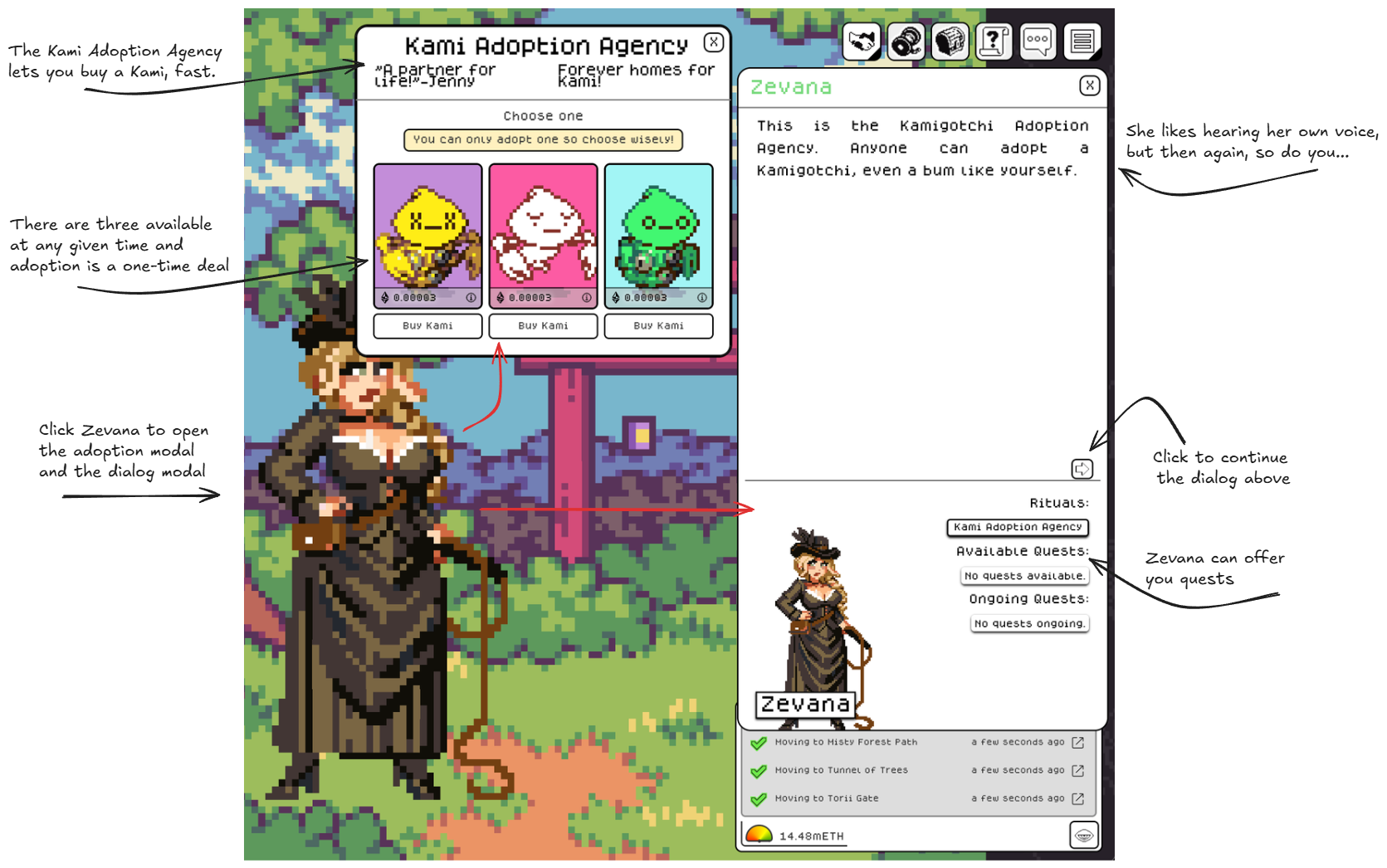
While you're able to create an Account and walk through the world, if you want to advance in the game you'll need a Kamigotchi. The fastest way of getting one is by adopting them from Zevana. You can find her in Torii Gate, a few moves south from the starting location. Make sure you do her quests, they’ll teach you the basics of the game.
You can also buy Kamigotchi on [KamiSwap](/kamigotchi/econ/kamiswap.md).
 ) button on the top right and clicking the "Fund" button.
## Acquiring a Kamigotchi
While you're able to create an Account and walk through the world, if you want to advance in the game you'll need a Kamigotchi. The fastest way of getting one is by adopting them from Zevana. You can find her in Torii Gate, a few moves south from the starting location. Make sure you do her quests, they’ll teach you the basics of the game.
) button on the top right and clicking the "Fund" button.
## Acquiring a Kamigotchi
While you're able to create an Account and walk through the world, if you want to advance in the game you'll need a Kamigotchi. The fastest way of getting one is by adopting them from Zevana. You can find her in Torii Gate, a few moves south from the starting location. Make sure you do her quests, they’ll teach you the basics of the game.